> ## Documentation Index
> Fetch the complete documentation index at: https://control-dev.mintlify.site/llms.txt
> Use this file to discover all available pages before exploring further.
# Track closed accounting periods
> See which accounting months are closed, understand source and manual close states, and record a manual close in Control.
export const ControlAppLink = ({path, breadcrumb, children}) => {
const link =
{children}
;
return breadcrumb ? {link} : link;
};
Use period-close information to identify actuals that may still change before you review or distribute a financial
report. Control reads lock information from connected accounting systems and lets authorized users record a separate
manual close decision for an entity.
## Review period status in a financial statement
Open a P\&L, Balance Sheet, Cash Flow, or Functional P\&L **Actuals** view. When at least one selected accounting source
with a known lock state remains open for a visible month and no manual close covers that month, Control shows:
* an amber open-lock icon beside the affected period column; and
* an **Open period** or **Open periods** control above the statement.
When a manual close covers a source-reported open month, Control hides the amber indicator and treats the month as
closed for monthly-close readiness. The source accounting system remains open until you lock it there.
Hover over an icon or the control to see which entity and source remain open and when Control last checked the source.
Select the control to open **Manage closed periods**.
The absence of an amber icon does not always prove that a period is closed. Statement indicators evaluate sources that
have reported a known lock state. Open **Manage closed periods** to check for unknown or unsupported sources.
## Understand source and manual states
Control keeps two kinds of period-close information separate:
| State | Set by | Effect |
| --------------------------- | ------------------------------------ | ------------------------------------------------------------------------------------------------------------------------- |
| **Accounting-system state** | The connected accounting integration | Read-only in Control. It reflects the latest lock information reported by the source system. |
| **Manual state in Control** | A Control user with edit permission | Affects Control's period indicators and monthly-close readiness. It does not lock or unlock the source accounting system. |
For period indicators and monthly-close readiness, a manual close takes precedence when it covers a month that the
source still reports as open. Control then treats that month as closed and does not show its amber **Open period** or
**Open periods** indicator. This precedence changes Control's readiness state only; it does not change the source lock.
If an entity has several enabled accounting sources, review every source shown in the dialog. A period can remain open
when any relevant source has not closed through that month, unless a manual close covers it.
The accounting-system state can show:
| Status | Meaning | What to do |
| ---------------------------- | ------------------------------------------------------------------------------ | ------------------------------------------------------------------------------------- |
| **Closed through *date*** | The source reported a known close cutoff. Months through that date are closed. | Reopen the period in the source system if it must accept new postings. |
| **No closed month reported** | The source reported its lock state but did not report a closed month. | Close the period in the source or record a manual close when appropriate. |
| **Status unknown** | Control has not received a usable lock state from the source. | Check sync history and retry the source synchronization before relying on the status. |
| **Not reported by source** | The connection cannot provide period locks automatically. | Confirm the close manually in Control. |
| **Not tracked** | The entity has no enabled accounting source that reports locks. | Use a manual close for CSV or manually maintained entities. |
Period-lock information is available for supported accounting integrations, including Procountor, Netvisor, Fortnox,
Visma eEkonomi, e-conomic, Tripletex, Xero, QuickBooks, and Xledger. What each provider considers locked is controlled
by that provider.
## Open the period-close details
You can open **Manage closed periods** from either location:
1. In a financial statement **Actuals** view, select **Open period**, **Open periods**, or **Period close** above the grid.
2. In Entities & sources, select **Period close** beside an entity.
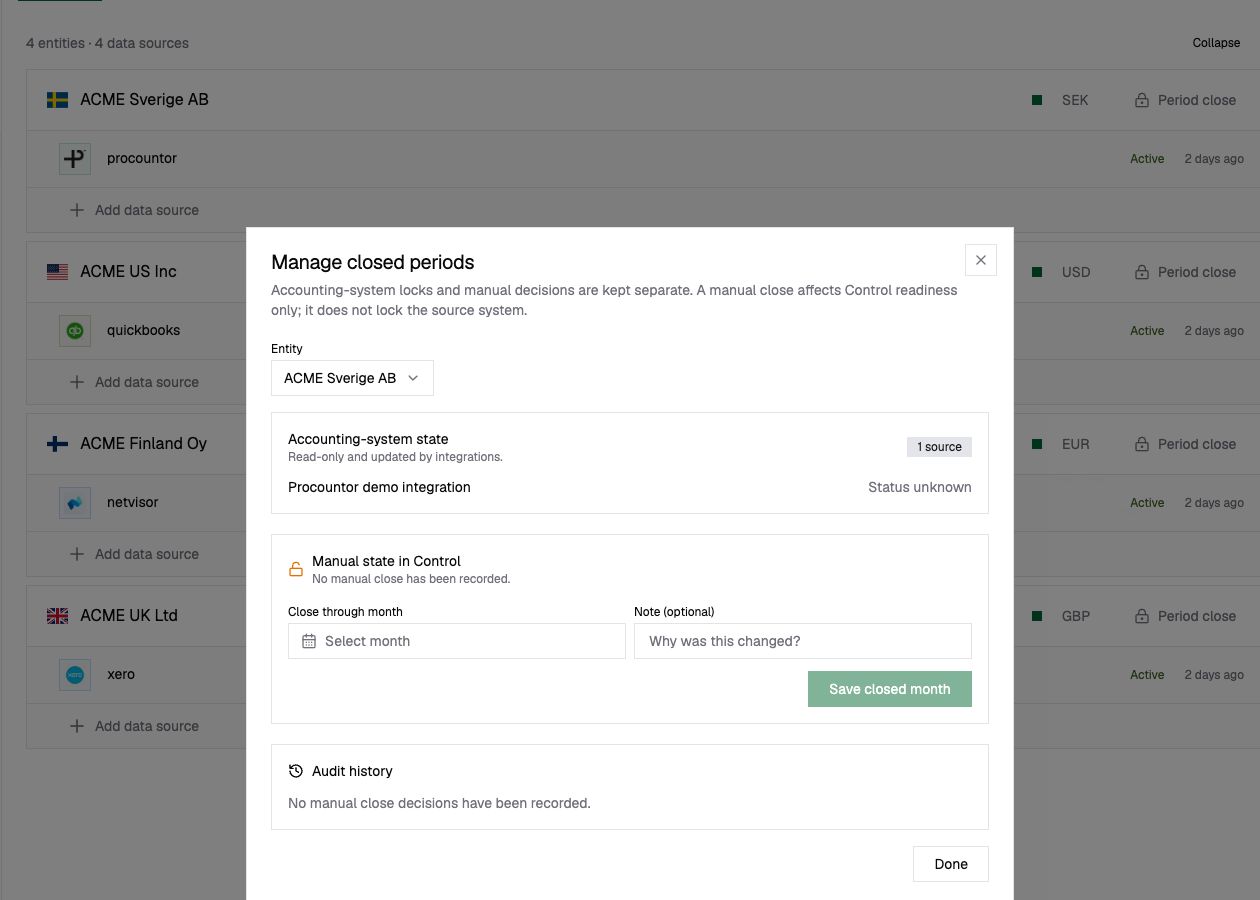
The dialog shows the latest read-only accounting-system state, the entity's manual state, and the audit history for
manual changes.
 ## Record a manual close
Record a manual close only after the responsible finance user has confirmed that the period is ready in Control.
1. Open **Manage closed periods**.
2. Select the entity.
3. Review the **Accounting-system state** before changing the manual state.
4. Under **Manual state in Control**, choose the final month that should be treated as closed.
5. Add an optional note explaining the decision.
6. Select **Save closed month**.
The selected month and every earlier month are treated as manually closed for Control readiness. The audit history
records who changed the state, when it changed, the optional note, and the source state at that time.
A manual close does not prevent postings or changes in the accounting system. Apply statutory or operational locks in
the source system itself.
## Reopen or remove a manual close
1. Open **Manage closed periods** for the entity.
2. Optionally add a note explaining why the state is changing.
3. Select **Reopen / remove manual close**.
You cannot use Control to reopen a month that the accounting source still reports as closed. Reopen it in the source
system first, wait for the updated lock state to synchronize, and then update the manual state if necessary.
## Verify the result
After saving or removing a manual close:
1. Confirm the new value under **Manual state in Control**.
2. Confirm that the change appears in **Audit history**.
3. Return to the financial statement and check the affected period indicator.
If the accounting-system state appears stale, review Sync history and wait for a successful accounting-source sync before relying on it.
## Related content
* [Connect accounting data](/product-docs/integrations/overview)
* [Keep transaction data current](/product-docs/transactions/data-freshness)
* [Financial statement reporting](/product-docs/reporting/financial-statements)
## Record a manual close
Record a manual close only after the responsible finance user has confirmed that the period is ready in Control.
1. Open **Manage closed periods**.
2. Select the entity.
3. Review the **Accounting-system state** before changing the manual state.
4. Under **Manual state in Control**, choose the final month that should be treated as closed.
5. Add an optional note explaining the decision.
6. Select **Save closed month**.
The selected month and every earlier month are treated as manually closed for Control readiness. The audit history
records who changed the state, when it changed, the optional note, and the source state at that time.
A manual close does not prevent postings or changes in the accounting system. Apply statutory or operational locks in
the source system itself.
## Reopen or remove a manual close
1. Open **Manage closed periods** for the entity.
2. Optionally add a note explaining why the state is changing.
3. Select **Reopen / remove manual close**.
You cannot use Control to reopen a month that the accounting source still reports as closed. Reopen it in the source
system first, wait for the updated lock state to synchronize, and then update the manual state if necessary.
## Verify the result
After saving or removing a manual close:
1. Confirm the new value under **Manual state in Control**.
2. Confirm that the change appears in **Audit history**.
3. Return to the financial statement and check the affected period indicator.
If the accounting-system state appears stale, review Sync history and wait for a successful accounting-source sync before relying on it.
## Related content
* [Connect accounting data](/product-docs/integrations/overview)
* [Keep transaction data current](/product-docs/transactions/data-freshness)
* [Financial statement reporting](/product-docs/reporting/financial-statements)