> ## Documentation Index
> Fetch the complete documentation index at: https://control-dev.mintlify.site/llms.txt
> Use this file to discover all available pages before exploring further.
# How financial data flows through Control
> Understand how source data becomes mapped, consolidated, and reportable financial information.
# How financial data flows through Control
Control brings financial data from your source systems into a consistent model that you can use across statements, analysis, budgets, and data outputs. Understanding this flow helps you set up the product in the right order and locate the cause of stale or unexpected numbers.
## Data flow
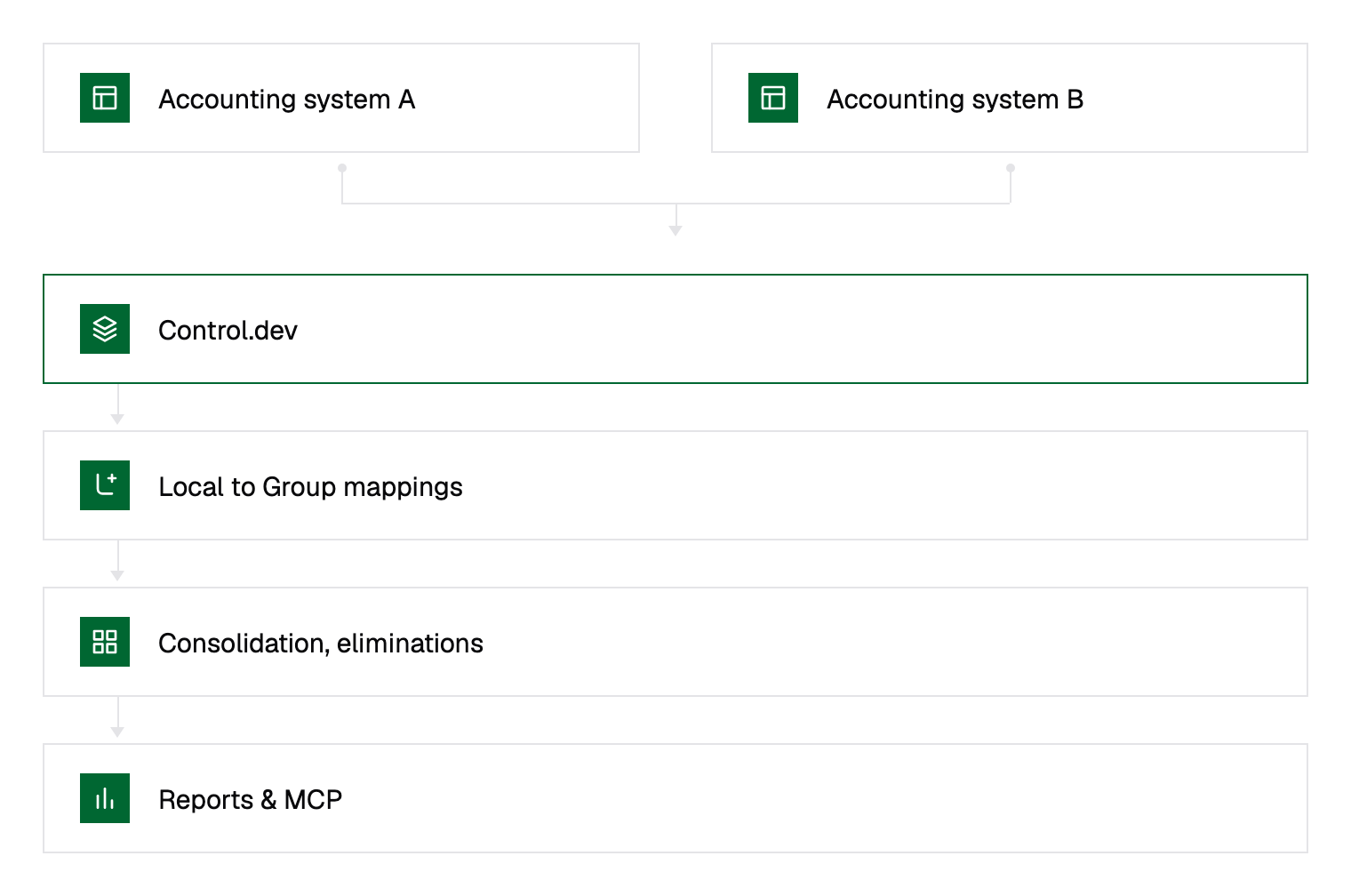
 Not every workflow uses every stage. For example, a single-entity workspace may use direct account mappings without multi-currency processing or eliminations.
## 1. Sources provide financial data
A **data source** is an accounting, CRM, HR, payment, or file-based system that supplies data to an entity. A configured link between an entity and a source is a **connection**.
During a sync, Control imports supported records from the source and associates them with the selected entity. Sync history shows when a connection last ran and whether it completed successfully.
Control preserves the source entity and its functional currency so you can trace reported values back to their origin.
## 2. Entities establish financial scope
An **entity** is a legal or reporting company whose financial data is managed in Control. Each connected source belongs to an entity.
Entity scope affects:
* which transactions are included in a view;
* which local accounts and dimensions are available for mapping;
* which functional currency applies before consolidation;
* how you compare or pivot results by entity.
Create entities before connecting sources or uploading transaction data.
## 3. Mappings standardize data across entities
Source systems can use different account codes, account names, and dimensions for equivalent financial activity. Control standardizes them through local-to-group mappings.
* A **local account** originates in an entity's source system.
* A **group account** belongs to the group chart of accounts.
* An **account mapping** connects a local account to a group account.
* Group dimensions standardize attributes such as department, project, region, or cost center.
Mapped data can be reported consistently even when the source systems use different structures. Unmapped accounts or dimension values can produce incomplete group views, so review mapping coverage after adding a source or changing a source chart of accounts.
## 4. Consolidation applies group-level processing
For multi-entity reporting, Control combines mapped entity data into the group view. Depending on your configuration, this includes:
* translating entity values into the group currency;
* applying consolidation rate exceptions;
* eliminating qualifying intragroup activity;
* applying manual consolidation adjustments.
Consolidated results are therefore not always a simple sum of the source entities. Currency translation, eliminations, and adjustments can change the displayed group total.
## 5. Statements organize financial results
The statement editor defines how group accounts appear in the P\&L, balance sheet, and cash flow statement. Statement structures can include groups, accounts, and formulas.
Actuals views apply the selected entity, period, dimension, currency, and comparison settings to the available financial data. You can drill down from a displayed amount to investigate the values that make it up.
## 6. Data outputs share prepared data
A **data output** sends prepared data from Control to an external destination. Data-output history shows the status and timing of output runs.
An output depends on the data and configuration available when it runs. If an output contains an unexpected number, verify the source sync, mappings, consolidation configuration, and statement result before troubleshooting the destination.
## Locate an unexpected value
Work through the flow from left to right:
| Check | What to verify |
| ------------- | ------------------------------------------------------------------------------ |
| Source | The expected record exists in the source system or uploaded file. |
| Sync | The latest relevant sync completed and includes the expected period. |
| Entity | The record belongs to the intended entity and functional currency. |
| Mapping | The local account and relevant dimensions map to the intended group structure. |
| Consolidation | The expected currency rate, elimination, and adjustment behavior applies. |
| Statement | The group account is included in the correct statement row or formula. |
| Output | The output ran after the upstream data or configuration changed. |
## Next steps
| If you want to… | Continue to… |
| --------------------------------- | ----------------------------------------------------------------------------------- |
| Prepare a multi-entity group view | [Consolidate a group](/product-docs/consolidation/consolidate-a-group) |
| Start configuring Control | Use the setup sequence described in this page, beginning with entities and sources. |
Not every workflow uses every stage. For example, a single-entity workspace may use direct account mappings without multi-currency processing or eliminations.
## 1. Sources provide financial data
A **data source** is an accounting, CRM, HR, payment, or file-based system that supplies data to an entity. A configured link between an entity and a source is a **connection**.
During a sync, Control imports supported records from the source and associates them with the selected entity. Sync history shows when a connection last ran and whether it completed successfully.
Control preserves the source entity and its functional currency so you can trace reported values back to their origin.
## 2. Entities establish financial scope
An **entity** is a legal or reporting company whose financial data is managed in Control. Each connected source belongs to an entity.
Entity scope affects:
* which transactions are included in a view;
* which local accounts and dimensions are available for mapping;
* which functional currency applies before consolidation;
* how you compare or pivot results by entity.
Create entities before connecting sources or uploading transaction data.
## 3. Mappings standardize data across entities
Source systems can use different account codes, account names, and dimensions for equivalent financial activity. Control standardizes them through local-to-group mappings.
* A **local account** originates in an entity's source system.
* A **group account** belongs to the group chart of accounts.
* An **account mapping** connects a local account to a group account.
* Group dimensions standardize attributes such as department, project, region, or cost center.
Mapped data can be reported consistently even when the source systems use different structures. Unmapped accounts or dimension values can produce incomplete group views, so review mapping coverage after adding a source or changing a source chart of accounts.
## 4. Consolidation applies group-level processing
For multi-entity reporting, Control combines mapped entity data into the group view. Depending on your configuration, this includes:
* translating entity values into the group currency;
* applying consolidation rate exceptions;
* eliminating qualifying intragroup activity;
* applying manual consolidation adjustments.
Consolidated results are therefore not always a simple sum of the source entities. Currency translation, eliminations, and adjustments can change the displayed group total.
## 5. Statements organize financial results
The statement editor defines how group accounts appear in the P\&L, balance sheet, and cash flow statement. Statement structures can include groups, accounts, and formulas.
Actuals views apply the selected entity, period, dimension, currency, and comparison settings to the available financial data. You can drill down from a displayed amount to investigate the values that make it up.
## 6. Data outputs share prepared data
A **data output** sends prepared data from Control to an external destination. Data-output history shows the status and timing of output runs.
An output depends on the data and configuration available when it runs. If an output contains an unexpected number, verify the source sync, mappings, consolidation configuration, and statement result before troubleshooting the destination.
## Locate an unexpected value
Work through the flow from left to right:
| Check | What to verify |
| ------------- | ------------------------------------------------------------------------------ |
| Source | The expected record exists in the source system or uploaded file. |
| Sync | The latest relevant sync completed and includes the expected period. |
| Entity | The record belongs to the intended entity and functional currency. |
| Mapping | The local account and relevant dimensions map to the intended group structure. |
| Consolidation | The expected currency rate, elimination, and adjustment behavior applies. |
| Statement | The group account is included in the correct statement row or formula. |
| Output | The output ran after the upstream data or configuration changed. |
## Next steps
| If you want to… | Continue to… |
| --------------------------------- | ----------------------------------------------------------------------------------- |
| Prepare a multi-entity group view | [Consolidate a group](/product-docs/consolidation/consolidate-a-group) |
| Start configuring Control | Use the setup sequence described in this page, beginning with entities and sources. |